The world of online technology is transitioning fast towards web 3.0. It seems like people are done with centralized systems with their digital privacy being maligned on daily basis by huge organizations. Therefore, they want a solution and web 3.0 seems to be the answer for now.
This blog post isn’t meant to cover the know-hows of blockchain and decentralized systems. Instead, this is for those who would like to build online solutions for users, customers, and clients to guarantee them better privacy and security for their data.
Having clarified that, in this article I am going to show you the ABC of how to make a decentralized application from scratch and set up your development environment. Below are some of the topics we are going to cover.
- Tools
- Setup Tools
- Write Code
A Look at the Tools
Below are some of the tools I am going to use in this blog post.
b. Ganache
d. Metamask
e. React 17.0.2
In order to get going, I would like to briefly touch a little bit about the above-mentioned tools.
The first one, Truffle Framework offers a set of tools for developing Ethereum smart contracts. It offers tools such as smart contract management, deployment and migration, network management, development console etc.
Ganache is a personal blockchain, which is a local development blockchain that can be used to mimic the behavior of a public blockchain.
Solidity is an object-oriented, high-level language for implementing smart contracts. To know more about Solidity please click here.
Most browsers currently do not allow us to connect to the blockchain network for that reason, I would use the Metamask chrome extension which will allow us to connect our chrome browser to the blockchain network.
For UI or Front end development, we are going to use React library which is one of the most widely used JavaScript libraries among the front-end communities.
Web3.js is a JavaScript library that allows us to communicate with the Ethereum blockchain. It turns our React application into blockchain enabled application.
Setting Up Tools
Now that I have briefly explained the tools set that are going to be used in this blog post, it’s time to get into it and set the tools up.
First and foremost, I would like you to download Truffle Framework and install it with the below command:
npm install -g truffle
Next, go ahead and download and install Ganache. Once you do that and open it, you will get the below screen:

Next, we need Metamask.
Go ahead and add Metamask extension to your google chrome and get to the screen when you get something like below. In order to set up Metamask please follow this blog post.

Writing Code
Now that the tools are set up, let’s proceed to the next step which is writing smart contracts. To do that, open a terminal and create a folder in your projects folder with the below command:
mkdir blockchain
Now make a folder inside the blockchain folder with the below command:
cd blockchainmkdir contractscd contracts
Now run the below command to create a truffle project which will allow us to develop smart contracts:
truffle init
With the above command, you should get an output like below:

Now open your truffle project in your favorite text editor. I am going to use Sublime Text. You should see the following folder and files structure:
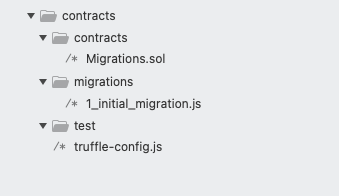
Inside contracts folder, we are going to write our smart contracts.
Within the migrations folder, we are going to migrate our newly created smart contracts.
Inside test folder, we usually write tests to test our smart contract however, it is beyond the scope of this blog post therefore, we are not going to get into that. I would highly recommend writing tests for your smart contracts before deploying them to public blockchain nodes.
truffle-config.js file contains all the configuration of or truffle project.
Now let’s write our smart contract. Create a new file and name it contacts.sol inside contracts folder. Now open that file and write the below code inside it:
pragma solidity >=0.4.22 <0.9.0;
This should always be the first line in your smart contract file. With this, we are specifying the version of solidity.
Now let’s make our first smart contract with code:https://betterprogramming.pub/media/178d8ebcc0947c9682f2a06b99413e3f
We can write a smart contract using the contract keyword and followed by the name of the contract which in this case Contacts.
Now to track the number of contacts inside our smart contract, we will create a state variable.https://betterprogramming.pub/media/b206192e479846390dd51e183770c0af
This is a special variable and any data we write into this variable will be stored in blockchain storage. We are using a special modifier keyword i.e. public to have access to this variable outside of the smart contract. Then we are assigning 0 to this variable.
Now that we have a state variable and it has a value in it. Let’s go into the front end part and let’s try to access this public state variable first. With this approach, we will establish communication between React application and our smart contract.
Run the below commands inside the blockchain folder to create a react application.https://betterprogramming.pub/media/e36cce3e851c3ee7866ce88750b16438
As you can see we also added web3.js as a dependency for this project to make our react application interact with our smart contract.
Now open that contacts folder in your favorite editor. I am using Sublime Text.
We are not going to set up the folder structure and implement complex architecture because that is out of the scope of this blog post.
We’ll write all our code in App.js file. Therefore, go ahead and open the file in your editor.
Write below code inside App.js file:https://betterprogramming.pub/media/ca74af9630de27cefcad5987c1d58b42
We are importing a couple of hooks from React and Web3 from Web3.js. Now let’s create a state variable like below:https://betterprogramming.pub/media/9f9975709f64f8268ddf357e8b192b94
Now inside useEffect hook we will with our smart contract like below:https://betterprogramming.pub/media/88fc1e1f94c8583dc328ae91ae01a087
Now in order to run this client-side successfully, we need to take a few steps in the backend. Let’s get back to contracts folder. First, open truffle-config.js file and add the below properties:https://betterprogramming.pub/media/e848488e3ba30448e425298e47bc39d6
Now inside migrations folder, create a new file and name it 2_deploy_contracts.js and paste the below code:https://betterprogramming.pub/media/f1c03a20c3f1c2b8505528b4deeba750
Now in the terminal, type the below code to migrate your contract:
truffle migrate
You should see an output something like below:

Now go back to the front end folder and run the below command to run the application:
yarn start
This will open your React application in your browser and it will trigger Metamask to interact with your blockchain network. You should see a screen like below:

In the above screen, click next and you should be presented with the below screen.

Now click connect. Then you should see the output on your browser with your account number like below:

Now that we have successfully interacted with our smart contract and retrieved account id. Let’s proceed with making a new function inside our smart contract to get a list of contacts and send it over to the front end and render them on the view.
Let go back to contracts folder and open Contracts.sol file and add the below function.https://betterprogramming.pub/media/dc3c48df76e0021868986517890a33ef
Now migrate this contract again as we made changes to this because smart contracts are immutable.
truffle migrate
Now let’s get back to the front end i.e. contacts folder. Create a new file config.js inside src/ folder and paste the below code in that.https://betterprogramming.pub/media/37eef2092ec439b9c9988c0eec8f7e14
Now import both smart contract address and ABI into App.js file like below and also update load function with below code:https://betterprogramming.pub/media/72c95fc41668ed217d3629d8d7037045
The above code will get all of the contacts from our smart contract and set them in contacts state variable. The code is very well commented on and explained.
Now let’s render all the contacts in ul like below.https://betterprogramming.pub/media/5a6f29d4f52d2e9b6da64285be7fda92
As you can find the updated code inside return — when you run this react app now in browser, you should be able to see something like below:

If that is what you see then congratulations, you have just built your first dApp with the smart contract and web app that interacts with your smart contract on the blockchain.
Now that you know how to retrieve information from the smart contract, go ahead and improve this further by adding new contacts, updating them and deleting them with full CRUD operations.
That’s it from this article. The entire project can be found in the below GitHub Repository:GitHub — zafar-saleem/blockchain-tutorialNote: This is a sample project for my blog on medium which can be found here. Clone this repository cd…github.com
Below are my social media profiles if you would like to get in contact with me.