Are you wondering how to build a messaging app with React Native that might scale more than 1 million users in a week of launch? If yes, then you are at the right place!
The blog covers the architecture and advanced features of developing a modern messaging app and a quick tutorial to help you get started right away with the leading technology. The goal is here to build a highly scalable chat app in less than a week.
Considering the scenario: if anyone would ask the type of application that I would love to launch to make the best for my business, then a chat and messaging app probably will be on the top on my list.
It may seem challenging and complex to build a chat app with modern features that support multimedia, photo sharing, calling, and more. However, at the same time, it seems to be simple as well, because React Native provides you with the support of third-party APIs that help in adding functionality to your chat app.
Now you must that React Native is a relatively young framework and how can it help you develop a full-fledged chat app for your business?
Exactly this question was on my mind when I got an opportunity to work for one of my clients. Their requirement was building an application with a range of chat features where I was a bit lucky to help them in technically scaling the app with more than 1 million users in a very short period of time. So this is exactly what I want to share and show you how to make a messaging app.
But before drilling straight into the tutorial, many of you are very much concerned with how much the process costs you and how React Native will help you in developing a chat app that seamlessly runs on iOS, Android, and other devices.
How Does React Native Help You Develop a Scaled Messaging App?
Whether you are a startup or a leading entrepreneur, why must you choose React Native for the chat app development?
While beginning with any app development project, each company has to go through a tedious process of deciding which is the right framework for their business. So, instead of trusting our statement, we have closely analyzed the key factors of React Native that help businesses to get started with the application and leverage millions of users.
A Quick Brief on React Native
React Native is a recently launched framework used for building cross-platform mobile applications using JavaScript. In a nutshell, the main idea behind using React Native is to create an application that seamlessly runs on multiple platforms. The logic behind writing an entire application in Javascript is you don’t need to use two separate programming languages for Android/iOS.
In other words, React Native is a cross-platform app development framework that allows you to write code once, and deploy it to both platforms including iOS and Android.
Here’s Why Businesses Should Choose React Native For Chat App Development
Despite being a new and young framework, React Native is already holding the trust of leading titans of the industry including Facebook, Instagram, Walmart, Bloomberg, Telsa, Vogue, UberEats, Skype and more.
Among all these Facebook Messenger is globally recognized as the top rank messaging app that too supported by React Native. The reason being, this framework makes your app effective in presenting the combined benefits of hybrid and native apps together under one roof.
Here are the top reasons why they have considered React Native for their company and why it is becoming a soaring framework for upcoming businesses.
- Add the Competitive Edge To Your Business
The digital world is moving at a fast pace and the businesses are hypercompetitive. In such scenarios, where every day thousands of applications are being submitted at the app and play stores, it becomes important for businesses to watch out for the time to market their app. In that case, React Native mobile app development solutions will help you complete the task sooner.
- Easy Availability of Talent
According to Stack Overflow’s developer survey, about 70% of respondents are already familiar with React Native as it is based on Javascript. Secondly, being at the top position and used by 42% of global developers, React Native is already become popular among tech companies, therefore, finding the best RN developer in the market is not a far-fetched job.
- Lower Development Cost
Because you can write codes that run on both platforms, the development cost to hire app developer is dramatically reduced if compared to developing native solutions. Even you don’t require a team of engineers to develop a solution, a single React Native app developer can help you create the app for both platforms.
- Reusable UI Components
When building a React Native app, the first thing that developers consider is to start defining the components that appear in many places within the app. These components are like reusable blocks, so written once and can be used in many places without spending more and more time on development and hence, save cost and time on an app development project.
- Compatibility to Cross-Platform
For cross-platform support, we are talking about iOS and Android. Initially, when created by a team of Facebook, it came only with iOS support in 2015, and started to support Android later in the same year.
Since then, the popularity of this framework has taken the world by storm and is constantly growing. With this framework at your service, all you need is to hire an app developer with expertise in UI elements and APIs. A developer can create an application for multiple platforms by simply using a single codebase.
In a Nutshell: Considering all such measures in an account, leading companies have adopted React Native for their companies. So in order to show the basic principles of building a modern architecture for any type of application, we will create a simple chat app that works on iOS, Android and the web.
Let’s get started with a chat app development tutorial that enables you to generate more than 1 million views!
Developing a Chat App With React Native Tutorial
In this tutorial, we will try to build a chat app using React Native and Expo, and with Firebase as the backend service. We’ll keep things very simple and easy to understand. The app will contain a simple authentication (signup/login) screen, chat room creation, and group messages within those rooms. In addition, the user will be allowed to upload a profile picture and the chat app will be more of a global chat room that works in real-time.
Let’s get started with coding the app:
Step 1: Start a New Project and Install Dependencies
To start a new project, you can use an Expo CLI for creating a new project. But in case, if you are focusing on a particular platform, then keep in mind that you need to have a particular IDE. Let’s say, if you are planning to build an app only for iOS, then you should use Xcode as your integrated development environment.
Installing Dependencies
To begin with the app, you must have to install Expo CLI on your local machine. For a hassle-free installation, a mobile app developer can run the below command in the terminal in order to install the CLI and generate a new project using it.
To install expo-cli: npm install -g expo-cli
- To generate new project
expo init RNfirebase-chat
- Choose blank template when asked
traverse inside the project directory
cd RNfirebase-chat
Once you have generated your project, you are advised to run it on devices or use an iOS simulator or Android emulator to ensure that everything is working smoothly. If you have hired an app developer for Android solutions, then make sure that your Android virtual device is running before executing the command below:
for iOS
npm run ios
for Android
npm run android
Next, install a dependency called react-native-gifted-chat that offers you a customizable UI for a chat application and ensuring seamless navigation between screens. For Navigation between multiple screens, experts can use the React-Navigation command, and at last, to connect with the Firebase Project, you need Firebase SDK.
Here is the quick short command for your use:
npm install — save react-native-gifted-chat react-navigation@2.18.x firebase UUID
Further, in order to create a chat app, you are going to need:
- A user authentication service for signup/log in to the application
- Service to the user’s email to avoid asking the user details again and again
- A service to store the user’s profile image
- A service to store chats and other messages
And, all these services are going to support by Firebase.
Step 2: Firebase Setup
Let’s come straight to the main point.
Since we required app authentication, cloud storage or email storage service for the chat app, therefore we need to set up Firebase.
Firebase is a cloud service supported by Google and going to handle authentication and database storage for the application. It provides an SDK with services like email and social media authentication, real-time database, machine learning kit, APIs and so on.
To get it set up, mobile app development companies can head over to this link and sign in using your Google account details. Then head to open up the console and Create a new project with your preferred name and region.

Once you have successfully created the project, you will be directed to the home screen with further access like the below image:

In the above image, take a look at the sidebar on the left, which is the main navigation in any Firebase Project.
(2.1) Firebase Authentication
So firstly, most software development companies begin with the authentication process. Click on the Authentication tab under Develop section, then click on the Sign-in Method. Enable Authentication using Email/Password and then proceed to click the save button.

(2.2) Firebase Database Storage
The next step is to click on the Database and check its rules for cloud data storage. Visit the second tab on the left sidebar menu and then select Realtime Database as shown in the image.

After clicking the real-time database, then click the select option “Rules” and make the changes like below.

Now you are done with the setup section. In the next part, let’s start building a chat app with React Native.
In case, if you stuck up at any point in the tutorial, you can get in touch with a mobile app development company, as they are backed by expert developers that can assist you right away.
Step 3: Creating a Chat Screen
Now, this is where the main functionality of the app comes into the role. The react-native-gifted-chat component allows you to display the chat messages that are sent by other users existing on your contact list.
To get started, create a new directory called “Components”. This is where you are going to store all components whether presentational or class. Inside this directory, create a new file, Chat.js with the following code snippet.

Now open the App.js file and add logic to create a navigational component using the react-navigation module. Initially, this file will contain a stack navigator, but later you can add more screens to the navigator. For now, we will focus only on a chat screen.
So to create Stack Navigator, mobile app developers can use the below command:
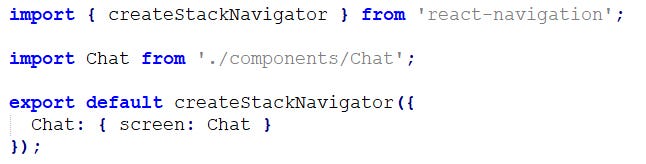
Now, if you are running these commands on the simulator device, then you will hardly notice anything on the screen. Currently, you will notice a plain white header, background and at the bottom of the screen, you will see the Send button. The button will automatically appear on your screen when the user starts typing the message as shown in the below image.

But, Send button has no functionality right now.
Step 4: Connecting The React Native Chat App With Firebase
There are many tutorials available on the internet explaining the steps to develop a chat app with React Native but no one provides you with the command that you need to proceed to accomplish the step.
So since we have already installed Firebase SDK dependency in our project, now it’s time to add other configuration in order to connect the React Native app with Firebase.
To make it possible, you need to create a folder called CONFIG and inside it a new file, FirebaseSDK.js. Further, you can hire mobile app developer to add the following keys by using the below-mentioned command:

Before that, keep in mind that to obtain and add the required keys in the above file you will have to visit the Firebase Console. There, click the gear icon which is next to Project Overview in the left-hand side menu bar, and lastly go to the Project settings section.
Now come directly to the login function, the heart of the whole app. The logic behind adding the functionality to the login button is to authenticate users who have been registered with email and password. Now it will have two callback function, one for the valid user credentials and another to restrict the access in case of invalid details or unregistered user credentials.
Step 5: Adding a Login Screen To The Chat App
To add a login screen in your React Native Chat App, you need to create a component file Login.js, inside the components directory with the code mentioned below:

By following these codes, you will get an idea that from where you can import the necessary components from React Native core and FirebaseSDK object. In addition, you need to run the codes for initial testing which also contains the same email ID and password as we used in the previous section.
Further, in Login.JS if you noticed, that there are two methods: LoginSuccess and LoginFailed. Both are the callback arguments that will process as per the user credentials as we have explained above. After implementing all the code commands, your chat screen will look like this:
Step 6: Creating a Signup/Sign Screen
Now, in this step, it’s time to add the functionality to your page and allow users to signup for the chat app. Since this is the most critical section of your app, though it makes sense to look for outsourcing mobile app development solutions to avoid any pitfalls in your app.
By using the stored credentials in the Firebase, your app will provide the access to the signup page. Apart, from email ID and password, make sure that your app will also be going to allow users fill up their name and upload the profile image to their chat app.
To create a new account with an email and password along with the user’s name aand profile image, you can use the below command:

Apart from all these, there is an initial stage that keeps track of all the user information. When the user enters all the required input field, the state object in the component will also get automatically updated.
So to make this work for your React Native Chat App, you need to make some changes inside the App.js file, by using the below command.

Step 7: Adding Chat Functionality
Since now the authentication and chat screen is working in your chat app, so move ahead and add the chat functionality itself. This component would require user information from the Firebase in order to create a chat message and send it to the other users.
So here is the quick command that you can adopt to add chat functionality:

So now you are all set to run your chat app again, either with NPM run iOS or NPM run Android to make sure that your app is working smoothly.
So now, you know the reasons why businesses should consider developing a chat app using React Native and tutorial to transform your idea into a robust app.
Now, you only left with the question that how much does it cost you to build a chat app with React Native?
How Much Does It Cost to Develop a Chat App Using React Native?
Great!
We have done a step by step process of making a perfectly scalable, robust chat app. But now taking some business considerations in mind, it’s time to frame out an answer for — how will it cost to make this app?
Considering the market statistics, the average cost to develop a chat app is starting from $10k to $50k and can go to any expensive price. Now you are wondering why there is a huge variation in the cost of development…
A matter of fact is, there are various things to evaluate including features, the number of screens, functionality, complexity, technology, cost of developer, location to hire an app developer and more.
So, to determine the exact chat app development cost, it makes sense to get in touch with an expert mobile app development company as they evaluate the idea and requirements and then provide you best solutions along with the budget!
Final Words
Hopefully, this chat app tutorial will help you understand the full functioning of a React Native chat app with Firebase. We have tried to keep each and every step very simple and sorted while explaining the customization, navigation, and configuration of the app with minimal coding. But still, if you have any doubt at any point in the tutorial, then you can hire a mobile app development company or get in touch with the experts.
This being a demanding app solution, many businesses prefer to get some inspirational tutorial and then customize the solution accordingly. But you don’t need to worry, the expert app developers can help you right from the scratch to the final implementation of the chat app without any hassle.